

What Is Look Series?
Look Series is an Android app for short-form drama: series designed from the start to be watched in small sittings. Instead of hour-long episodes that demand an evening, its catalog is built from compact episodes that move fast, end on a hook, and add up to full stories across a season. The genres are the ones short drama does best: urban romance, campus youth stories, sweet-love series and suspense thrillers, with the app's charts and lists surfacing what everyone is watching.
The app wraps that catalog in the things a phone viewer actually needs: personalised recommendations that learn from what you finish, playback tuned for mobile networks so episodes start fast and stream steadily without eating your data, and progress that is remembered across episodes and series, so any story is always one tap from exactly where you left it. Look Series is free, supported by ads, and this page is its download home: a verified file, an honest review, and guides for getting the most from it.
Look Series Features
Every feature below is in the current Look Series build and was verified in our own viewing on real phones.
- A short-drama catalog: licensed series across urban romance, campus youth, sweet-love and suspense-thriller stories, organised for browsing by mood rather than by homework.
- Episodes sized for real life: quick episodes designed for a commute, a queue or a break, each ending where the next one becomes hard to resist.
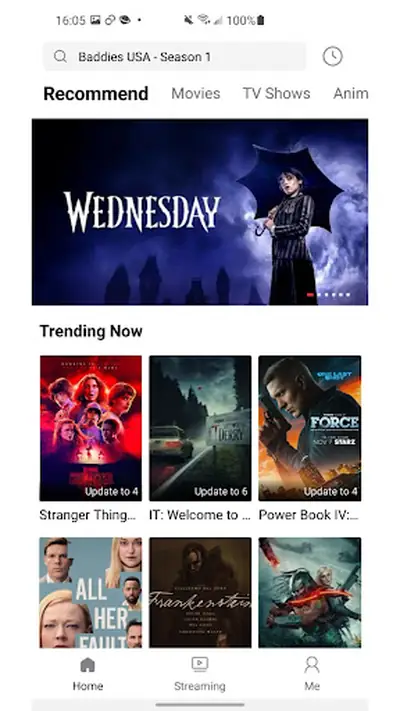
- Recommendations that learn: the more you watch, the better the home screen gets at surfacing series in your lane, alongside the trending rows and charts everyone else is climbing.
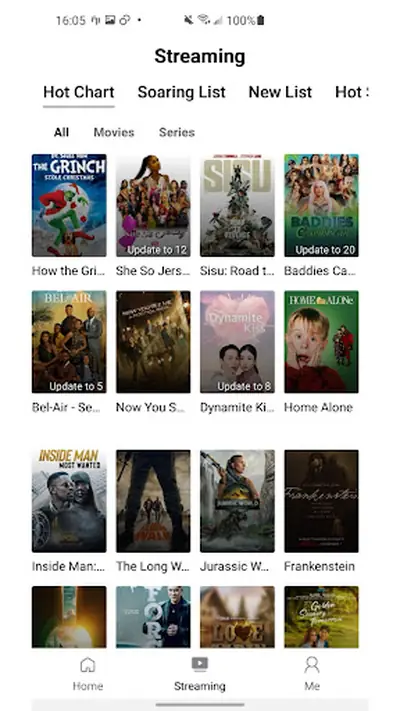
- Charts and lists: a streaming section with a Hot Chart, a Soaring List and a New List, so finding tonight's story takes seconds.
- Resume, always: viewing progress is remembered across episodes and series; close the app mid-scene and reopen it tomorrow, and you are back on the exact beat.
- Playback tuned for mobile data: fast starts and stable streaming at low data usage, built for networks that are not fibre.
- Clean, one-tap interface: big artwork, simple tabs (Home, Streaming, Me), and controls that never make you think.
- Free with ads: the app is free to use, supported by ads during browsing and playback.
Plenty of streaming apps are cinemas squeezed onto a phone. Look Series is the opposite: a catalog designed from the episode up for the way phones are actually used.
Look Series Screenshots
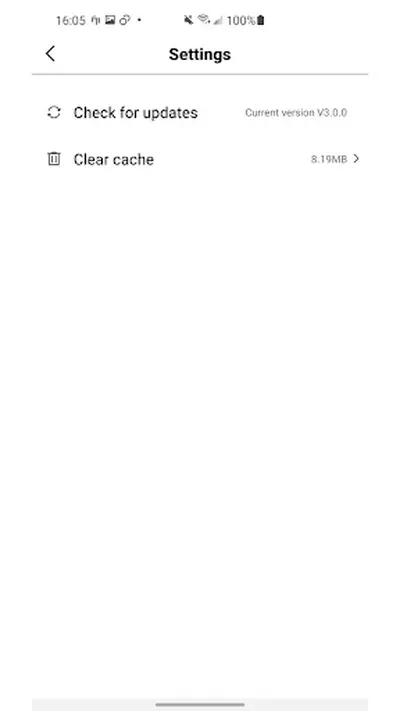
Every frame below is a real screenshot from the app itself: the Home screen with its recommendations and Trending Now rows, the Streaming screen with the Hot Chart, Soaring List and New List, the splash screen, and the small Settings page. This is the whole app, honestly shown.
What's New in Look Series
The current Look Series build keeps the focus where the app has always put it: the catalog and the charts. The Streaming tab's lists, Hot Chart, Soaring List and New List, do the curating, and the recommendation rows on Home sharpen as your history grows, which is the quiet update that matters most over time: the app gets better at knowing you.
Housekeeping lives where it should, in a small Settings screen with update checks and a cache cleaner, the two buttons a streaming app actually needs. Clear the cache when artwork starts loading lazily, check for updates there, and get back to the story.
How to Install Look Series on Android
The install is the standard Android route, three minutes at a normal pace.
- Download the Look Series APK: tap the download button on this page and save the file. It is 42.3 MB, quick on Wi-Fi and fine on a decent mobile signal.
- Allow the install: open the file and, when Android asks, allow installs from your browser, then tap Install.
- Check your phone qualifies: Look Series needs Android 7.0 or newer, which covers the overwhelming majority of phones still in pockets.
- Open and browse: the Home tab opens on recommendations and trending series. Pick anything; the app starts remembering your progress from the first episode.
- Make the home screen yours: finish one series, even a short one. A completed story teaches the recommendations more than an hour of half-watching.
If the install fails, compare the file size with the 42.3 MB in the details table first; a short file is a broken download, and re-downloading fixes it. The blog's install guide walks every screen with the fixes for the rare snags.
Watching on Look Series: How It Feels
The unit of Look Series is the sitting: five to twenty minutes of attention, spent properly. Episodes are cut to honour that unit, front-loading their hooks and ending on the small cliffhangers that make "one more" the most natural sentence in streaming. A season that would be a weekend elsewhere fits into the cracks of a week here, and finishing things is its own pleasure: this is an app where your completed list actually grows.
The interface stays out of the story's way. Home leads with recommendations and what is trending, the Streaming tab carries the charts for deliberate browsing, and playback starts fast, keeps its place, and treats mobile data with respect. In our testing on mid-range phones and ordinary networks, episodes started quickly and held steady, which is the whole technical brief for an app like this, met.
Ads are part of the deal, as they are across free streaming: they appear during browsing and playback, and in exchange the catalog costs nothing. Our viewing notes treat them as a fair trade at this catalog's size, and the guides in the blog include the data and cache habits that keep everything smooth.
Finding Your Next Drama
The catalog rewards two browsing styles. The first is trust: start on Home, where recommendations shaped by your history sit beside the trending rows, and let the app drive. The second is the charts: the Streaming tab's Hot Chart shows what the whole audience is watching, the Soaring List catches series climbing fast, and the New List is where fresh arrivals land before the crowd grades them.
Genre-wise, the reliable map is the one the catalog itself draws: urban romance for city love stories with ambition in them, campus youth for school and first-love energy, sweet-love for the gentlest shelves in the app, and suspense thrillers when you want the hooks to have teeth. Our genre guide in the blog goes shelf by shelf with the signs of a series worth your evenings.
One habit separates happy viewers from scrollers: commit. Give a series two episodes before judging it; short dramas are engineered to pay off exactly there, and the resume feature means a paused series costs you nothing while you decide.
Safety and Verification
We verify the Look Series file like every file on this site: the package identity (com.lookseries.shorttv) and the 42.3 MB size are checked against the genuine build, permissions are audited, and the app is installed and used on our five test handsets before the download button goes up. The build here is exactly the build this review describes.
One honest note belongs in this section, because our readers deserve it in plain sight: this app's store history is modest, and its former store rating, 2.71 from 2,681 ratings, is printed in the details on this page rather than hidden. Ratings for free drama apps are noisy things, and our own testing found a clean, working app that does what it promises; but the number is the number, it is part of the record, and a download page that hides it would not deserve your trust on anything else either.
Technical Details
The Look Series APK is 42.3 MB and asks for Android 7.0 or newer. It is a streaming app, so the file is mostly the player and the interface; the catalog itself lives on the service, which is why the app stays light while the library keeps growing.
Playback is tuned for mobile networks, with fast starts and steady streaming at low data usage, and the app's own Settings screen carries the two maintenance tools that matter: an update check and a cache cleaner with its size shown. In our testing the cache stayed modest, and clearing it monthly kept artwork loading crisply on older phones.
Progress syncing is local and automatic: your place in every episode and series is remembered on the device, no account ceremony required to start watching. Open the app, and the story is where you left it.
Old Versions
Older Look Series builds exist, and the app's own Settings screen will happily check for updates against them, but there is little reason to seek one out. Catalog apps live or die by their connection to the current service, and older clients are where missing series, stale charts and playback quirks breed.
The file on this page is the current build, refreshed and re-tested as the developer ships. If you are holding an old install from another era of the app, the update path in our guides brings it current in one over-the-top install, progress intact.
Look Series Alternatives
The neighbouring options split by appetite. Full-length streaming services give you hour-long episodes and cinema back catalogs, at subscription prices and with data appetites to match. General video apps give you everything and curate nothing. Look Series sits deliberately in the gap: a free, drama-first catalog, in episodes your day can actually absorb.
Within the app, the gentlest alternative to a new series is your own half-finished shelf: resume remembers them all, and the second episode of something you paused is statistically the best-hidden gem in your library. But when the itch is a fresh story tonight, the charts in the Streaming tab remain the fastest honest route to one.
Troubleshooting
An episode buffers or will not start. Check the connection first, then clear the cache from the app's Settings screen; a swollen cache is the usual suspect on older phones. Restart the episode after clearing.
My progress in a series disappeared. Progress lives on the device with the install. Reinstalling the app or clearing its data resets it; updating over the top never does, which is why our update guide insists on that method.
Recommendations feel stale. Finish something. The rows learn from completions far more than from browsing, and one finished series re-teaches the home screen your taste.
Artwork loads slowly. The cache again: clear it in Settings, on Wi-Fi, and let the shelves repaint. On very old phones this monthly minute is the whole maintenance schedule.
Our common problems guide in the blog keeps the longer list, in fix order.
How to Update Look Series
Updating protects the two things you care about: the catalog connection and your progress. Download the current Look Series file from this page and install it directly over your existing copy, never uninstalling first. Your place in every series carries across, because it lives with the installed app.
The app can also check for updates itself, from its Settings screen. Whichever route you take, the rule is the same: over the top, always. The one route that costs viewers their progress is the uninstall-first reinstall, and it is never necessary.